
For most agencies building a list of local businesses, Apify's Google Maps Scraper is the best starting point: it bills per place at prices we verified live, has a free monthly credit for testing and adds website emails as a separately priced add-on. Choose Scrap.io for a no-code subscription with monthly export credits, PhantomBuster if your team already runs Phantoms, and Bright Data if a developer wants raw place data through an API. Outscraper is worth checking too, but its site blocked our pricing check, so we couldn't confirm its current rates. Whichever you pick, the scraper is the cheap part. The real work is turning a listing into a verified address at a business you're allowed to email.
A Google Maps result gives you the business name, category, address, phone number, website, rating, review count, opening hours and a place ID. Email isn't among the place fields these vendors document. Apify and PhantomBuster get emails in a second step by visiting the business website, as does Outscraper according to its archived product page; Scrap.io includes emails in its export without saying how it collects them. Either way, the addresses are often generic inboxes such as info@, not the owner's address.
Evidence and disclosure (checked October 16, 2026): We read each vendor's current pricing and documentation pages and captured their public websites. Outscraper's live site showed us a bot-verification page, so we couldn't verify its current pricing; the rates we mention come from its own pricing page as archived by the Internet Archive on June 17, 2026, and are labeled as unconfirmed. We didn't run these tools in an account, so there's no data-quality, email-coverage or speed benchmark here. OutboundXYZ has no affiliate relationship with any of the five scrapers. We do have affiliate relationships with Instantly and Smartlead, which appear later as sending destinations; that didn't decide the ranking. Nothing here is legal advice.
Google Maps lead scrapers compared
| Tool | Best for | Verified price and billing basis | Key limit | Main drawback | Official source |
|---|---|---|---|---|---|
| Apify Google Maps Scraper | Large, scheduled or API-driven runs | $4 per 1,000 places on the Free plan ($5 monthly credit); $3 on Starter ($19/month), $2 on Scale ($199/month), $1.50 on Business ($999/month) | Contacts, leads, verification and social data are separate billable add-ons | Many settings; costs depend on which add-ons you switch on | Actor pricing |
| Scrap.io | No-code exports by city or area with email and phone filters | Basic $49/month billed monthly or $35/month billed yearly, 10,000 export credits; Professional $99/month, 20,000 | Basic plan searches by city only, with up to 5 business types | Monthly credits don't roll over; a subscription for a one-off list | Pricing |
| PhantomBuster (Google Maps Search Export) | Teams already running PhantomBuster workflows | Start $56/month billed annually ($672/year) with 20 hours of execution time; 14-day trial | Its page says Google Maps shows about 120 results per search; emails need a second Phantom | Billed by execution time, so cost per record is hard to predict | Pricing, Phantom |
| Bright Data Google Maps Scraper API | Developers who want raw place data at volume | 5,000 records/month free; $1.5 per 1,000 records pay as you go; Scale $499/month with 384,000 records, then $1.3 per 1,000 | Published field list doesn't include email | Developer setup; you build the email step elsewhere | Scraper API |
| Outscraper | Worth checking for pay-as-you-go place and website-email data | Not verified on Oct 16, 2026 (site blocked automated checks); archived June 17, 2026 page listed $3 per 1,000 places after 500 free | Emails need its separate Emails & Contacts enrichment | Current pricing and terms unconfirmed | Pricing |
Every price is a public USD list price before tax. A "record" or "place" is one business listing, not one contact person.
How we narrowed the list
We included maintained Google Maps data products with public pricing, a CSV or API export and a stated route to contact details, and compared the billing unit, free allowance, search limits, where emails come from and export options.
We left some options out. Browser-extension scrapers run in your own browser session and suit one-off pulls, so we didn't evaluate them in depth. D7 Lead Finder's plan prices load dynamically and its site doesn't name Google Maps as its source, so we couldn't verify either. General B2B databases are a different tool, covered in our email finder comparison, and tend to be thin on owner-run businesses with no LinkedIn presence. To pull emails from websites you already have, see scraping emails from websites; for where list tools fit overall, see lead generation tools by job.
The five scrapers by use case
1. Apify Google Maps Scraper: best overall for local lead lists
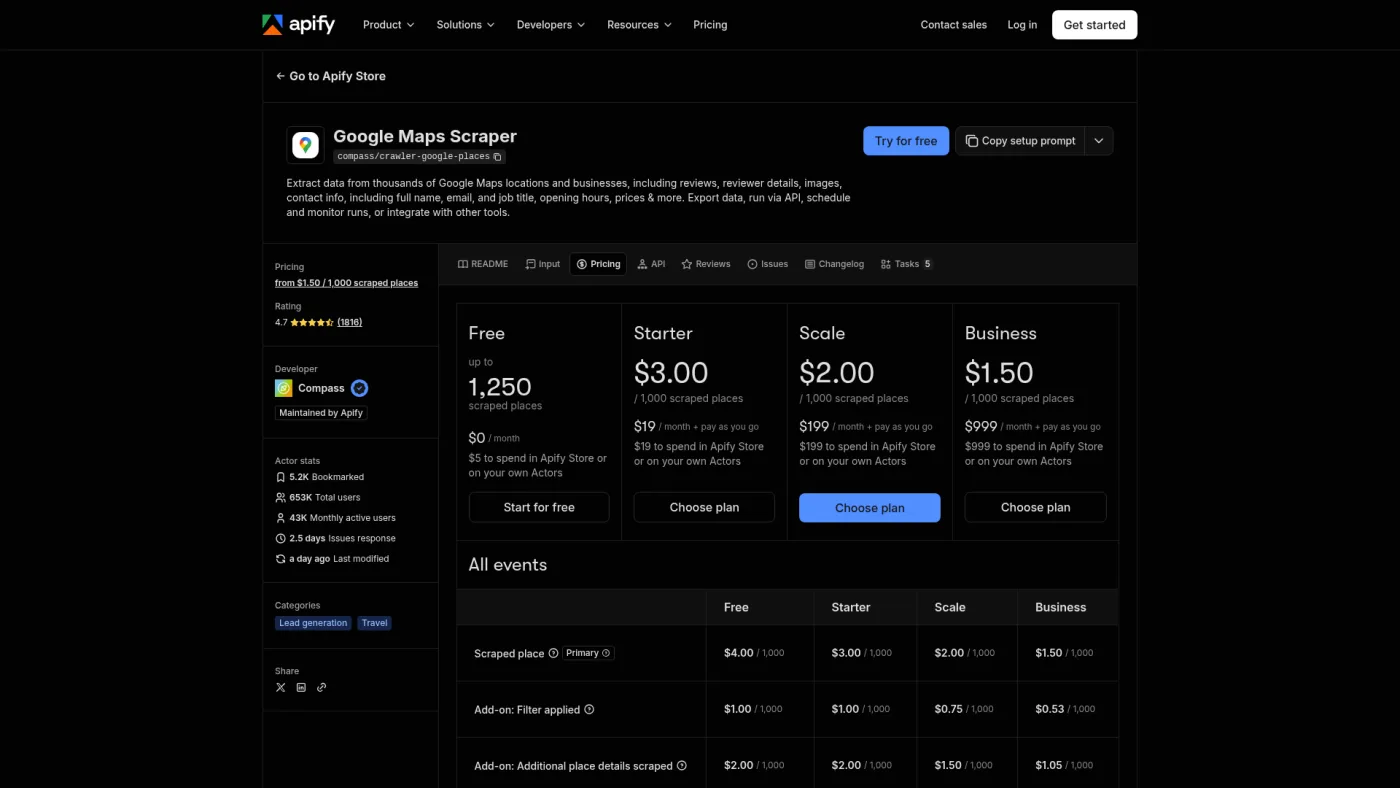
Apify Google Maps Scraper public pricing page, captured October 16, 2026.
Apify's Google Maps Scraper, maintained by Apify, bills per event. A scraped place costs $4 per 1,000 on the Free plan, $3 on Starter, $2 on Scale and $1.50 on Business; those paid plans cost $19, $199 and $999 a month, each including that amount as usage credit. The Free plan's $5 monthly credit covers up to 1,250 places: enough for a test, not an agency list with add-ons.
Each add-on is billed separately. Company contacts enrichment ($2 per 1,000 on Free and Starter) collects company emails, phones and social profiles from the website. Business leads enrichment ($5 per 1,000 on Starter) adds named people with job titles and, where available, work emails, and an email verification add-on checks those lead emails. For German, Austrian and Swiss businesses, the README says contacts enrichment also reads the Impressum page, which often names the owner.
The README notes that pasting a single Maps search URL instead of using the location field caps results at 120, because one map screen only scrolls so far.
Best for: most agencies, from a free-credit test to scheduled or API-driven runs, as long as someone is comfortable configuring inputs. Drawback: the bill depends on the add-ons, and on the Free plan leads enrichment and verification cost $100 per 1,000, so build real lists on a paid plan.
2. Scrap.io: best no-code subscription for area exports
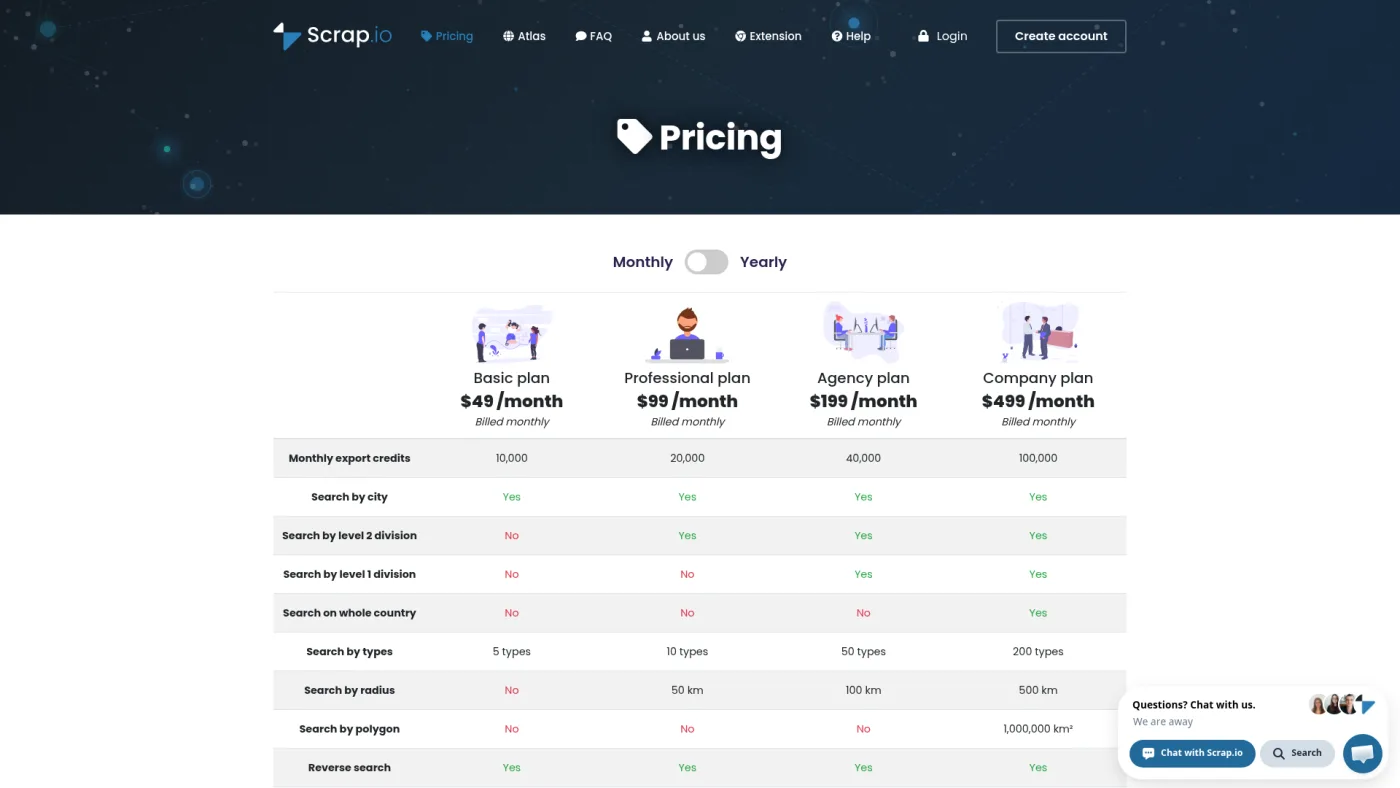
Scrap.io public pricing page, captured October 16, 2026.
Scrap.io works more like a searchable directory than a scraper you configure. Its homepage says it continuously updates its own database and exports names, addresses, phones, emails, websites, social links and reviews from Google Maps, Apple Maps and Bing Maps. You pick a category and area, then filter on website, phone, email, rating or social profile.
The pricing page lists Basic at $49/month billed monthly (or $35/month billed yearly) with 10,000 export credits, up to Company at $499/month with 100,000. A place counts once per 30-day period, and credits reset monthly. Basic searches by city with up to five business types; radius search starts on Professional, and whole-country or polygon search needs Company. There's a seven-day trial capped at 100 leads. Scrap.io calls its data GDPR and CCPA compliant, which is its position on its own processing, not on your outreach. We found no public description of email verification.
Best for: account managers who want to filter and export without configuring anything. Drawback: a monthly subscription even for one list, and unused credits don't carry over.
3. PhantomBuster: best if you already run Phantoms
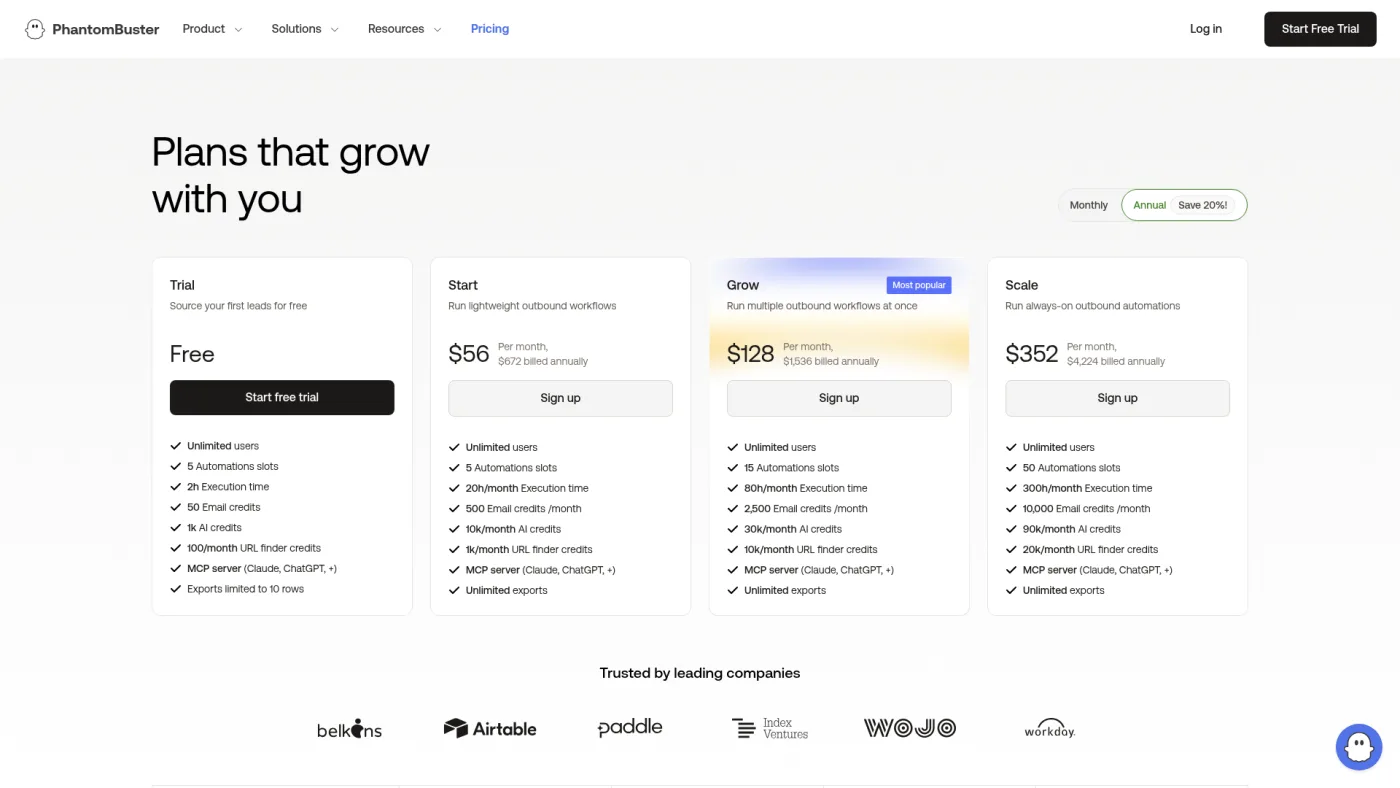
PhantomBuster public pricing page, captured October 16, 2026.
PhantomBuster's Google Maps Search Export Phantom exports a Maps search into a CSV with contact, social and website data and skips duplicates between searches. Its page says Google Maps shows about 120 results per search, so you get more by running narrower searches. It also recommends a proxy near your target location, which is a separate cost.
Emails need its Data Scraping Crawler Phantom, which visits each business website for emails, phones and social links. That suits teams already chaining Phantoms; our PhantomBuster review treats the product as an automation workbench, not a plug-and-play prospecting tool.
The pricing page lists Start at $56/month billed annually ($672/year) with five automation slots and 20 hours of execution time. Monthly billing costs more: the toggle showed €69 for Start in our session, and currency may vary by location. The 14-day trial includes two hours of execution time and limits exports to 10 rows: enough to inspect output, not to build a list.
Best for: teams already paying for PhantomBuster. Drawback: execution time, not records, drives the bill, and PhantomBuster doesn't publish how many places an hour produces.
4. Bright Data: best developer API for raw place data
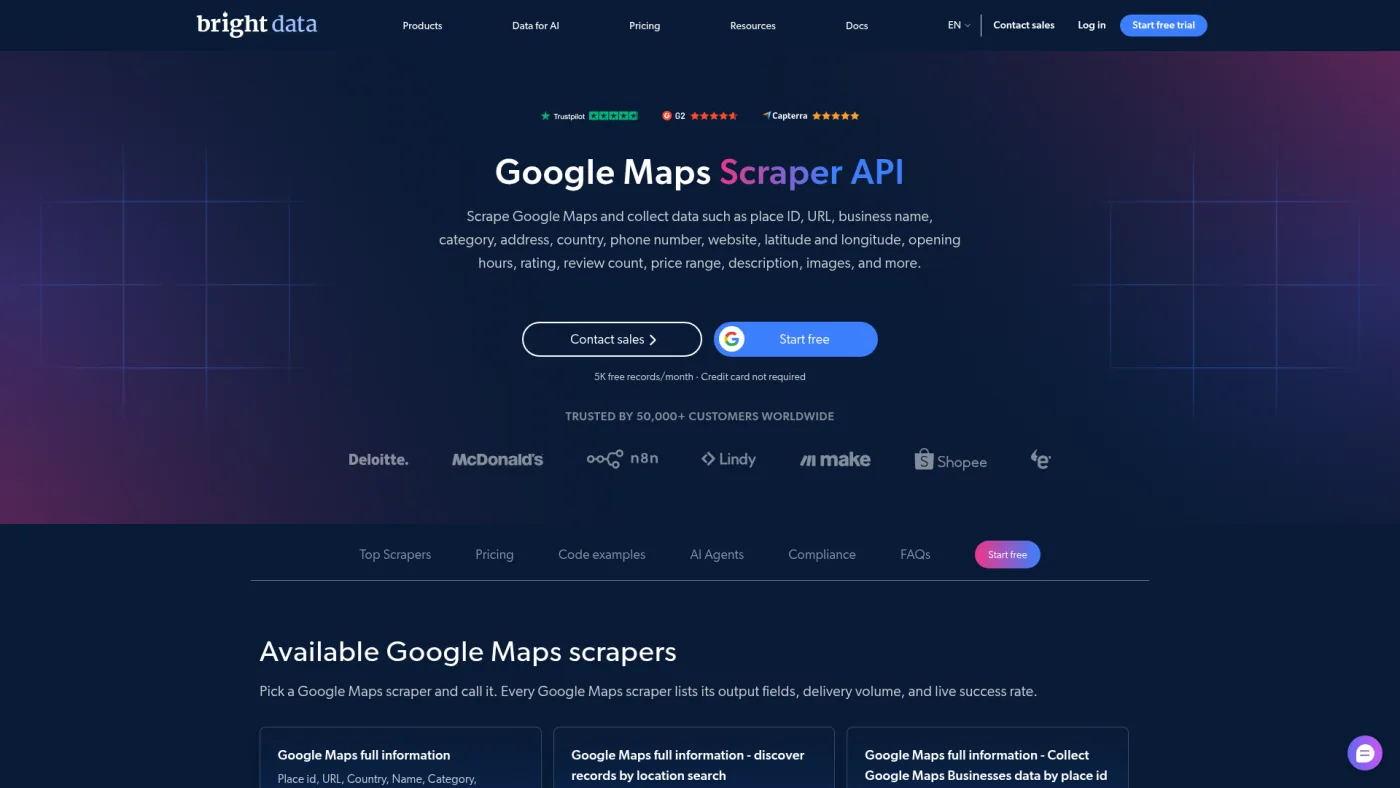
Bright Data Google Maps Scraper API public page, captured October 16, 2026.
Bright Data's Google Maps Scraper API returns place ID, name, category, address, phone, website, coordinates, hours, rating, review count and more. The page offers 5,000 free records per month without a credit card, $1.5 per 1,000 records pay as you go, and a Scale plan at $499/month with 384,000 records and $1.3 per 1,000 after that. Bright Data says the price includes proxies, unblocking and parsing, and that you pay only for successful deliveries. It also sells ready-made Google Maps datasets.
The published field list doesn't include email, so plan a website crawl or email finder after export.
Best for: a developer feeding a database or CRM with predictable per-record pricing. Drawback: no documented email field, and it's the wrong tool for a salesperson who wants a spreadsheet by lunch.
5. Outscraper: worth checking, current pricing unconfirmed
Outscraper sells Google Maps data per record with no subscription, but we couldn't verify its current pricing: its site blocked our automated checks on October 16, 2026, and we didn't bypass the bot check. The following rates are archived and unconfirmed. Its pricing page as archived on June 17, 2026 listed the first 500 places free, then $3 per 1,000 from 501 to 100,000 and $1 per 1,000 after that, with tiers resetting every 30 days and prepaid credits that don't expire.
Emails are a separate service. Outscraper's archived Maps scraper page (June 23, 2026) describes an Emails & Contacts Scraper enrichment that looks up each place's website domain and adds the emails it finds (up to three columns), website phone numbers and social profiles. The archived pricing listed it at $3 per 1,000 domains after 500 free, and an email verifier at $3 per 1,000 after 25 free.
In a May 31, 2023 video, Jan named Outscraper as the tool his team recommended for local businesses: LinkedIn-based databases miss owners who aren't on LinkedIn, while the same businesses list themselves on Google Maps to be found by customers. That's a dated recommendation, not a 2026 test.
Screenshot exception: Outscraper's site returned a bot-verification page to our capture tool and browser on October 16, 2026, so there's no image rather than an older or generated one.
Worth checking if: you want per-record billing without a subscription and can confirm the live rates and terms in a normal browser before buying. Drawback: current pricing is unverified, and email coverage depends on what each website publishes.
The official route: Google Places API isn't a list builder
Google's Places API is the sanctioned way to query place data. Text Search requests that ask for phone numbers or websites trigger the Text Search Enterprise SKU: 1,000 free billable events a month, then $35 per 1,000, with up to 20 places per page (price list, checked October 16, 2026).
The catch is the terms. The Google Maps Platform Terms (section 3.2.3) bar scraping or exporting Maps content for use outside the services, citing "copy and save business names, addresses, or user reviews" as an example. Google's Places policies let you store place IDs indefinitely, but not other content beyond narrow exceptions. The API suits showing live place data in your own app, not building a prospect CSV.
Google's terms, privacy and email law
Google's terms. The Google Maps end-user Additional Terms (last modified January 27, 2026) say users may not "mass download or create bulk feeds of the content", among other restrictions. Every scraper above collects Maps content in bulk, so assume you're working against Google's stated terms either way.
Legality is a separate question. Whether breaching a site's terms is unlawful depends on your jurisdiction, how the data is collected and how it's used. Apify, Scrap.io and Outscraper each publish legal claims; those are vendor statements, not clearance for your use, and nobody can honestly promise this is "100% legal".
Privacy. A named owner's email is personal data under the EU and UK GDPR. Collect only what the campaign needs, record your lawful basis, and be ready to tell people where you got their details.
Email rules. In the US, the FTC's CAN-SPAM guide says the law makes no exception for business-to-business email. Messages need, among other things, accurate headers, a non-deceptive subject line, a valid physical postal address and an opt-out you honor within 10 business days, with penalties up to $53,088 per violating email. In the UK, the ICO's electronic mail marketing guidance says you can email corporate bodies, but sole traders and some partnerships are treated as individuals, so you need their consent unless they're existing customers who were offered an opt-out. A local plumber or salon may well be one. EU countries apply their own rules, so check the recipient's country, and see our CAN-SPAM overview for the US side.
What 2,000 local places might cost
Suppose an agency wants 2,000 dental practices across several metro areas, pulled in one 30-day window as many small searches. Assumptions: website contact extraction runs on all 2,000 rows, no reviews or photos, public USD list prices, verification priced separately. This is a procurement model, not a test of how many usable emails you'd get.
| Option | Place data | Website emails | Likely bill for this run |
|---|---|---|---|
| Apify, Starter plan | 2,000 × $3/1,000 = $6 | Company contacts: 2,000 × $2/1,000 = $4 | $19 subscription; the $10 of usage fits inside its credit |
| Scrap.io, Basic plan | 2,000 of 10,000 monthly credits | Included where found | $49 monthly, or $35/month on a yearly plan |
| PhantomBuster, Start plan | At about 120 per search, at least 17 searches | Second Phantom on each website | $56/month billed annually; execution hours per record aren't published |
| Bright Data, pay as you go | Inside the 5,000 free records | Not included | $0 for place data, plus a separate email step |
| Outscraper: unverified (archived rates) | Archived June 2026 rates: 500 free + 1,500 × $3/1,000 = $4.50 | Archived rates: 500 free + 1,500 × $3/1,000 = $4.50 | About $9 if those rates still apply; not confirmed |
The takeaway: data cost is not the decision. Among the verified options, the bill runs from $0 (Bright Data, place data only) to $49 (Scrap.io), plus PhantomBuster's $56 monthly equivalent on an annual commitment. We've left Outscraper out of that comparison because its rates are unconfirmed, and the Places API isn't in the table because its terms bar saving the names and addresses. What matters is whether emails come with the export, how much setup your team can handle, whether billing fits a one-off or a monthly process, and how much cleanup is left. Verification adds a little; our email verification comparison covers dedicated verifiers.
After export: the pipeline before Instantly or Smartlead
- Deduplicate. Use the place ID first, then website domain and phone. Multi-location practices share a domain, so decide whether you email the group or one location.
- Filter. Drop places marked closed, rows with no website (unless you'll call them), wrong categories pulled in by broad search terms, and businesses outside your service area.
- Segment by category. In a January 2024 video, Jan argued that "we help dentists" lands better with dentists than a generic local-business message, without narrowing the whole agency to one niche. One Maps category, one campaign.
- Find a person, or accept the role inbox. Check the about, team or Impressum page for the owner, or use an email finder. For some segments
info@is the realistic route, so write for whoever reads the front-desk inbox. - Verify every address. Website-scraped addresses can be out of date, and bounces hurt the mailboxes you send from. Quarantine invalid and unknown results, and decide in advance how to treat catch-all domains.
- Screen for compliance. Remove sole traders where consent is required, keep a suppression list, and add a working opt-out (Instantly and Smartlead setup guides).
- Upload with honest variables. Category, city, rating and review count can support a relevant first line; don't claim you visited a site you didn't. Then import into Instantly, Smartlead or the sequencer you already use.
One caution from the same 2023 video (21:13): Jan said he wasn't a big fan of local-business email outreach because email often isn't their main channel, and he'd pick up the phone more often, though it can work with a good offer. Keep the phone column, and check your market's calling rules before using it. The B2B prospecting stack shows how data, enrichment and activation fit together.
Our recommendation: start with Apify's Google Maps Scraper, testing on the free credit and building real lists on Starter with company contacts enrichment. Pick Scrap.io for no-code filtering, PhantomBuster only if you already run it, and Bright Data when a developer owns the pipeline. Consider Outscraper only after confirming its current pricing and terms on its live site.
Frequently asked questions
Can you get emails from Google Maps?
Not directly. Listings give you a website and phone number; Apify and PhantomBuster get emails by visiting that website in a second step (Outscraper's archived page describes the same approach), and Scrap.io includes emails from its own database without detailing the source. Expect gaps and generic inboxes, and verify before sending.
Is it legal to scrape Google Maps for leads?
Google's Maps terms prohibit mass downloading and bulk feeds, and its Maps Platform terms bar saving business names and addresses. Whether breaching them is unlawful depends on your jurisdiction and use. Emailing the businesses has its own rules, such as CAN-SPAM in the US and PECR consent for UK sole traders. Get legal advice for your situation.
Why does my Google Maps scraper stop at about 120 results?
PhantomBuster's page says Google Maps shows about 120 results per search, and Apify's README describes the same cap for a single map view. Split the area into smaller searches by neighborhood, ZIP code or radius, then deduplicate.
Is there a free Google Maps scraper?
Verified free allowances: Apify's $5 monthly credit (up to 1,250 places), Bright Data's 5,000 records a month, Scrap.io's seven-day trial capped at 100 leads and PhantomBuster's 14-day trial with 10-row exports. Outscraper's archived June 2026 page listed 500 free places per 30 days, which we couldn't confirm. They suit testing, not an ongoing agency list.