
For an agency watching 20 or more client sending domains, HetrixTools is the strongest starting point in this comparison: its $9.95 Personal plan covers 256 monitors, every plan checks the same 94 IP and domain blocklists, and you can label monitors by client. Choose BlacklistMaster when check frequency matters more than client separation, Generator Labs when you want pay-per-check pricing and an API, and MxToolbox Delivery Center only if you also want DMARC reporting and inbox placement tests on one $129 monthly bill. If every client sends through Google Workspace or Microsoft 365 and you track fewer than about 30 domains, HetrixTools' free plan may be all you need.
A blacklist monitor answers one narrow question: did a domain or IP you care about appear on a public DNS blocklist (DNSBL) since the last check? DMARC monitoring answers a different one: who sends mail as your domain, and does it authenticate? Our DMARC monitoring comparison covers that purchase; the two overlap only where a DMARC platform bundles a blocklist feature. For cold email, the lists that usually matter are domain lists such as Spamhaus DBL, SURBL and URIBL, because Workspace and Microsoft 365 mail leaves from the provider's IP addresses, not yours.
Evidence and disclosure (checked October 16, 2026): We read each vendor's current pricing and product pages, the blocklist operators' usage and removal pages, and the Google, Microsoft, Instantly and Smartlead documentation linked below, and we captured each vendor's public pricing page. We did not open paid accounts, compare detection speed or accuracy, or test whether a listing changed inbox placement. List counts and alert speed are vendor claims. Instantly and Smartlead appear only because their tracking-domain settings affect what you should monitor; OutboundXYZ has an affiliate relationship with both, and it did not decide the tool order or the steps. Monitoring vendor links go to official sites and are not affiliate links. Prices are USD list prices before tax.
Blacklist monitors for agency client domains compared
| Tool | Best fit | Verified entry price and billing | Monitors, interval and key limit | Main drawback | Official source |
|---|---|---|---|---|---|
| HetrixTools | Large client portfolios needing labels, sub-accounts and cheap monitor counts | Free for 32 monitors; Personal $9.95/month or $99.95/year | Personal: 256 monitors, 12-hour checks, 30-day history, one sub-account | Free checks daily and needs a login every 90 days; lower plans get lower queue priority | Pricing |
| BlacklistMaster | Frequent checks on a known number of domains and IPs | 20 monitors: $25/month at 2-hour checks, $37/month at 20-minute checks | Price grid by monitor count and interval; one year of status history | No client sub-accounts on the pages we read; gaps between tiers | Pricing |
| Generator Labs (formerly RBLTracker) | API-first teams wanting pay-per-check pricing | Free for one host; Enterprise $16/month for 50 hosts; Ultimate $0.005 per check | Enterprise: 12-hour checks; Ultimate: hourly to 48-hour checks, unlimited hosts | Fixed packages stop at 50 hosts; per-check spend rises with frequency | Pricing, docs |
| MxToolbox | Agencies also wanting DMARC reports, placement tests and delisting help | Free: one domain, weekly checks, top 30 lists; Delivery Center $129/month | Delivery Center: 64 blacklist monitors, five domains, five users | Expensive for alerts alone; five domains is tight for an agency | Plans |
A "monitor" is one IP address or one domain on HetrixTools and BlacklistMaster; Generator Labs calls it a "host". MxToolbox lists blacklist monitors and domains as separate allowances, so ask how they interact before counting on 64 client domains.
What an agency should actually monitor
Provider IPs are mostly not yours. Google's SPF setup guide explains that the SPF record lists the servers that send for your domain; for Workspace that is include:_spf.google.com. Microsoft's outbound spam documentation says Microsoft 365 checks its own outbound IPs against non-Microsoft blocklists and handles delisting itself, and routes suspected spam through a separate high-risk delivery pool. An alert on a shared provider IP tells you little about one client and gives you nothing to delist.
Domains are yours, including linked ones. Spamhaus says its Domain Blocklist is checked against the HELO and Mail From domains during SMTP and against domains in headers and body, such as URLs. SURBL's FAQ says its data is meant for message body URIs. So monitor each client's sending domains, the website linked in emails and the domain behind tracking links.
Decide on tracking domains deliberately. Instantly's custom tracking domain guide says its default tracking URL is shared among Instantly customers unless you set up your own, and Smartlead's tracking domain guide warns that shared tracking URLs can hurt deliverability. You can't delist a shared domain for a client, so give each client a custom tracking hostname; our Instantly and Smartlead tracking-domain guides cover the setup. When it sits on the sending domain, you already monitor that domain, and tools that accept hostnames can watch the tracking hostname too. A separate tracking domain needs its own monitor. For product context, see our Instantly review and Smartlead review.
Dedicated IPs are the exception. If a client sends through infrastructure with its own IPs, such as the dedicated-IP plans in our agency mailbox provider comparison, watch those IPs on lists like Spamhaus ZEN, Barracuda and SpamCop. Our dedicated vs. shared IP explainer covers the trade-off.
How we narrowed the list
We kept tools that run scheduled checks with alerts, cover domain blocklists as well as IPs, publish a price, document alert channels and offer some way to separate clients. We did not score detection accuracy; public pages cannot establish it. We left out:
- GlockApps: its IP reputation monitor is documented for IP addresses; we found no domain blocklist monitor in its help.
- WebSitePulse: its blacklist service watches mail server IPs, and its pricing page showed no blacklist price.
- DMARC platforms with a blocklist feature, such as Suped, whose pricing page lists blocklist monitoring from its Business plan. If you already pay for one, ask whether it covers domain lists and every client domain.
- Warmup and placement-testing tools, priced per mailbox or per test (compared in our inbox placement testing guide), and one-off lookups, which don't run on a schedule.
The four tools, by agency situation
1. HetrixTools — best value for a large client portfolio
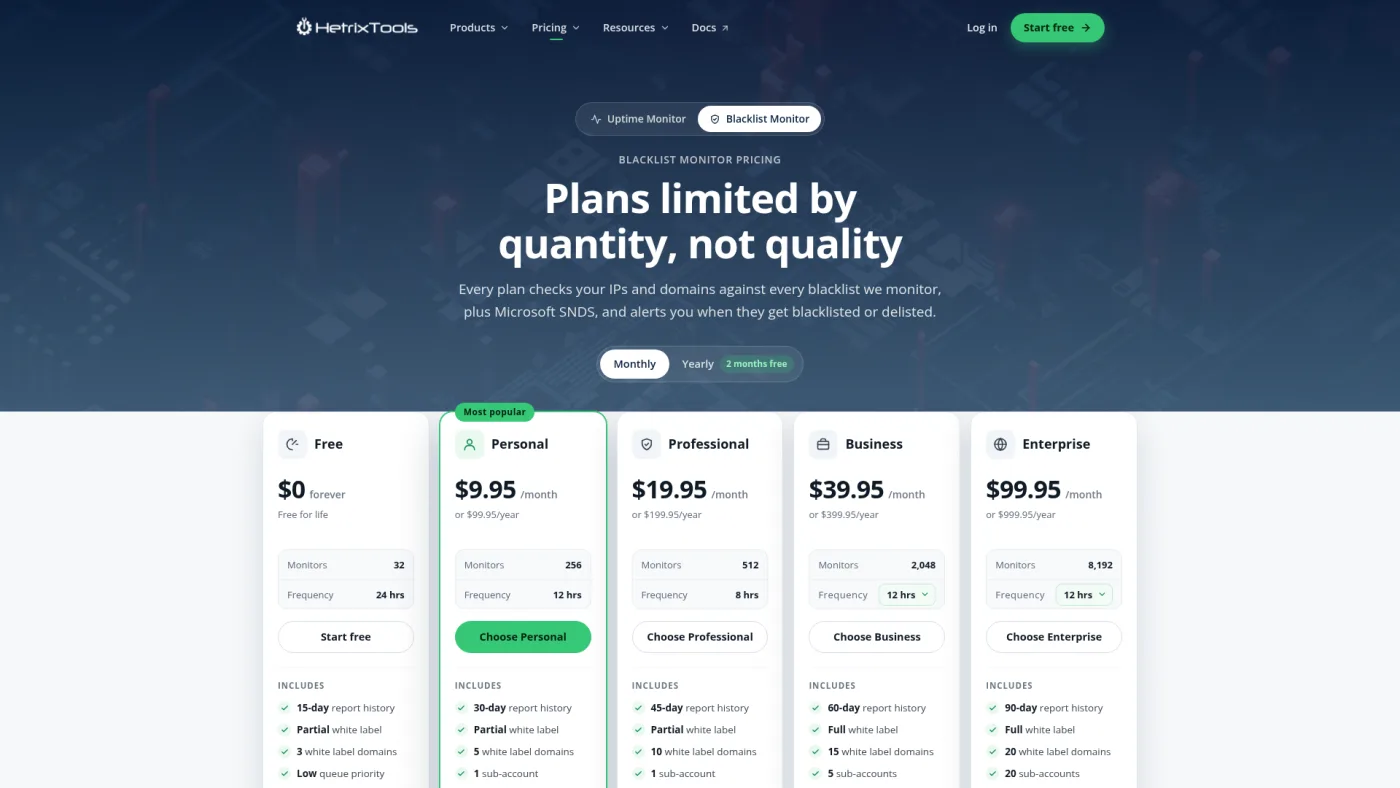
HetrixTools public blacklist monitor pricing page, captured October 16, 2026.
HetrixTools' pricing page separates plans by quantity: every plan checks the same 94 IPv4 and domain blacklists and includes Microsoft SNDS. Free covers 32 monitors at 24-hour checks with 15 days of history and no sub-accounts, and you must log in every 90 days. Personal costs $9.95 a month or $99.95 a year for 256 monitors at 12-hour checks, 30 days of history and one sub-account. Business at $39.95 a month adds five sub-accounts and full white label; that price is shown at the 12-hour default, with faster intervals down to two hours selectable, so confirm the checkout total.
Its published list includes dbl.spamhaus.org, multi.surbl.org and black.uribl.com, each with a delisting link. The features page covers what an agency uses: bulk-adding domains, labelling monitors by client, saved views such as one client's listings on one list, bundled alerts to 20+ channels including Slack and webhooks, delisting links in alert emails on paid plans, and ignoring a blocklist you don't trust across the account.
The trade-offs are speed and context. HetrixTools says lower queue priority can delay checks, and at 12-hour intervals a listing can sit for hours unnoticed. The product is built around servers and IP ranges, so you get listing data, not cold email context.
Choose it when: you need many client domains watched cheaply with labels. Pass when: you need sub-hour checks without Business pricing.
2. BlacklistMaster — best for frequent checks at a known monitor count
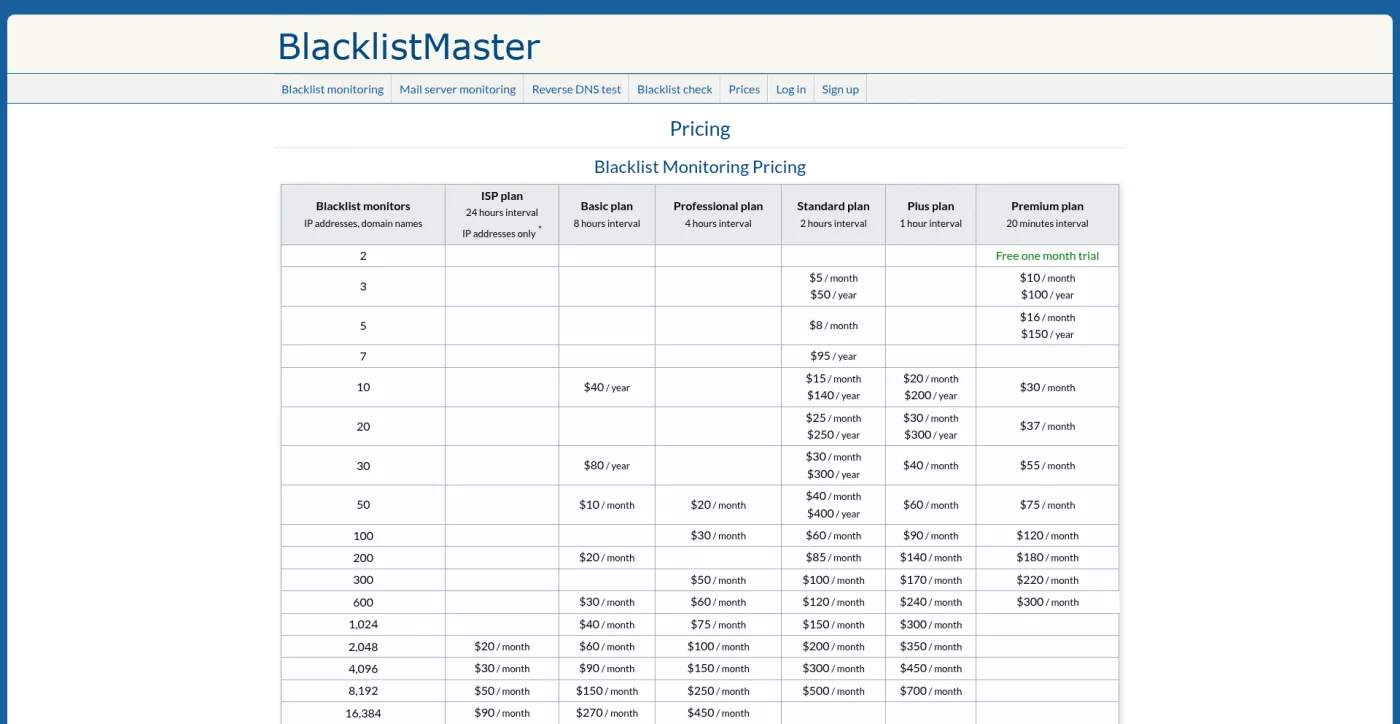
BlacklistMaster public pricing page, captured October 16, 2026; cropped at the bottom to remove a cookie notice.
BlacklistMaster's pricing grid prices each combination of monitor count and interval. 20 monitors cost $25 a month or $250 a year at two-hour checks, $30 a month hourly and $37 a month at 20-minute checks. 50 monitors start at $10 a month with eight-hour checks. Monitors can be IPv4, IPv6 or domains, except on the IP-focused ISP plan, which includes ten domain monitors. A two-monitor, one-month trial appears in the Premium column.
Its blacklist directory lists Spamhaus DBL and URIBL among its domain lists. Every plan includes email, web callback, Slack, Telegram and Discord alerts, daily or weekly HTML or PDF reports and one year of status history; the monitoring page shows per-blacklist severity settings and monitor groups.
The grid has gaps, so you sometimes buy the next tier up; the eight-hour Basic plan has no 100-monitor price, for example. We found no client sub-accounts on the pages we read, so client separation means groups and naming inside one account.
Choose it when: you want 20-minute to two-hour checks on a few dozen domains. Pass when: clients or account managers need their own logins.
3. Generator Labs (formerly RBLTracker) — best for API-first teams and pay-per-check
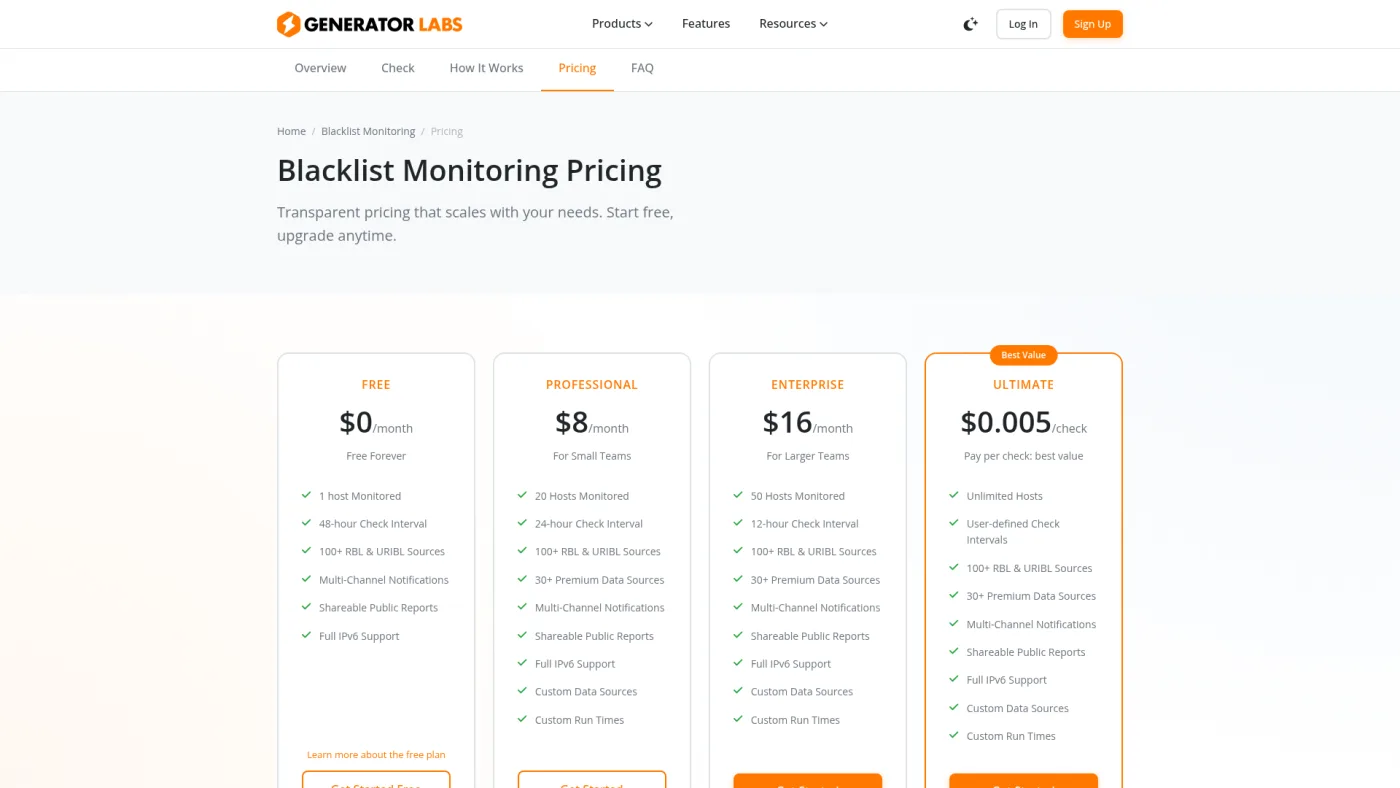
Generator Labs public blacklist monitoring pricing page, captured October 16, 2026.
The old rbltracker.com address now redirects to Generator Labs. Its pricing page lists Free for one host at 48-hour checks, Professional at $8 a month for 20 hosts at 24-hour checks, Enterprise at $16 a month for 50 hosts at 12-hour checks and Ultimate at $0.005 per check. The Ultimate docs say that rate applies below 200 hosts, intervals run from 48 hours to hourly, credit never expires and checks stop when it runs out. Another pricing doc mentions paying for monthly packages in 6-, 12- or 24-month increments, so confirm the minimum term at checkout.
Hosts can be IPs or domains. The free plan page names Spamhaus, Barracuda, SpamCop and SURBL among its sources and says paid plans add Microsoft SNDS, Google Postmaster Tools and PhishTank. The vendor says the Postmaster integration can alert when your Gmail spam rate climbs, which matters more to Workspace senders than an IP list. Per its FAQ, alerts go to email, SMS, Slack, Telegram, PagerDuty or webhooks and include removal instructions; there is no delisting service. Every plan includes role-based team accounts and a REST API.
Choose it when: you want listings in your own reporting or ticketing. Pass when: you want a fixed monthly bill for more than 50 hosts.
4. MxToolbox Delivery Center — best when blocklists are one part of a deliverability suite
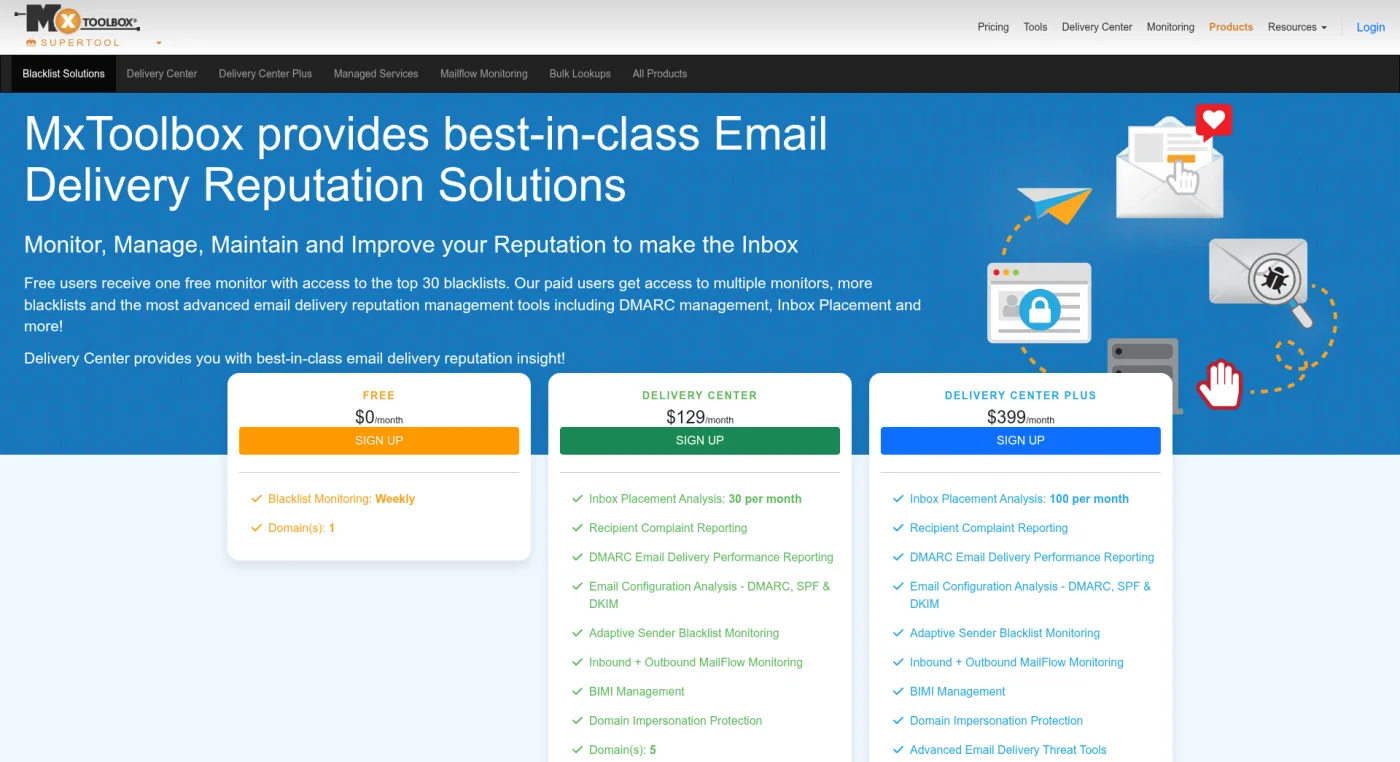
MxToolbox public blacklist solutions page, captured October 16, 2026; cropped at the bottom to remove a footer bar.
MxToolbox's plan comparison lists a free account with one domain, weekly checks and the top 30 blacklists; the page calls this one free monitor, while its plan table lists two. Delivery Center at $129 a month lists 64 blacklist monitors, 100+ blacklists including domain-based ones, five domains, five users, 30 inbox placement analyses a month, DMARC reporting, alerts and delisting support by email. Delivery Center Plus at $399 a month lists 256 monitors, ten users, 100 placement analyses and phone support.
The Adaptive Blacklist Monitoring page explains that the feature works through DMARC: MxToolbox discovers your sending sources from DMARC data and watches their IPs. That suits a company with many third-party senders. For an agency whose clients send through Google or Microsoft, much of what it discovers will be provider IPs you can't act on. The same page notes that Google, Yahoo and Outlook keep proprietary blocklists a DNSBL check can't see.
Choose it when: a few key clients need DMARC reports, placement tests and blocklist alerts from one vendor. Pass when: you only need listing alerts across 20 or more domains.
Free checks worth keeping, and why DIY scripts break
You don't need a paid tool to confirm a listing. Spamhaus says its IP and Domain Reputation Checker is the only place DBL removals are handled. SURBL's lookup page hosts its removal process, and URIBL's lookup form is where its delisting requests start. Our email deliverability test checks public DNS records but does not query blocklists.
A homemade scheduled checker is harder than it looks. Spamhaus' DNSBL terms of use offer its public mirrors free for non-commercial use by small and medium organizations, require queries from an identifiable network and require a subscription for commercial use. Spamhaus returns the error answer 127.255.255.254 to queries through resolvers without attributable reverse DNS, naming Cloudflare's resolver as one example, and URIBL's FAQ says a 127.0.0.255 answer means your DNS was rated as abusing its mirrors. A naive script can read those answers as listings, or skip them and leave a gap.
What monitoring 20 client domains costs
Assumptions: 20 clients, each with three cold email sending domains plus one website domain linked in emails, giving 80 domain monitors. Tracking hostnames sit on the sending domains and no client has dedicated IPs. The smaller column assumes 30 monitors. Prices are list prices checked October 16, 2026, before tax. This compares cost, not detection quality.
| Tool | 30 monitors | 80 monitors | What the number does not tell you |
|---|---|---|---|
| HetrixTools | $0 on Free (32 monitors, 24-hour checks) | $9.95/month on Personal (256 monitors, 12-hour checks), or $99.95/year | Free has no sub-accounts and needs a login every 90 days |
| BlacklistMaster | $80/year at 8-hour checks, or $30/month at 2-hour checks | $20/month at 8-hour checks (200-monitor tier), or $30/month at 4-hour checks | No client sub-accounts on the pages we read |
| Generator Labs | $16/month on Enterprise (50 hosts, 12-hour checks), or about $9/month on Ultimate at the same interval | About $24/month on Ultimate at 12-hour checks (80 × 2 × 30 days × $0.005); about $12 at daily checks | Hourly checks on 80 hosts would be about $288/month |
| MxToolbox | $129/month on Delivery Center (64 monitors) | Exceeds Delivery Center's 64 monitors; Plus lists 256 for $399/month | Includes DMARC reporting and placement tests you may not need |
For listing alerts alone, the subscription is rarely the expensive part. Three of the four tools cover this 80-domain portfolio for $24 a month or less. The real cost is the person who reads an alert, works out which client and campaign it touches, and stops the damage. Choose the tool whose labels, alert routing and access make that person faster.
Setup checklist for an agency portfolio
- Inventory each client: sending domains, domains linked in emails, the tracking domain and any dedicated IPs. Leave out Google and Microsoft sending IPs.
- Label every monitor by client and role, such as
acme / sendingoracme / linked. - Decide which lists page someone. For domains, start with Spamhaus DBL, SURBL and URIBL; for dedicated IPs, add Spamhaus ZEN, Barracuda and SpamCop. Send the rest to a digest or ignore lists you don't trust.
- Route alerts to one deliverability channel and a named owner per client. Give clients a short report on what happened and what you did, not raw alerts.
- Confirm the first scheduled report arrived, and update the inventory whenever you add a client or domain.
If a listing arrives with rising bounces or falling replies, the cold email deliverability recovery stack explains how to slow down first. The multi-client deliverability stack covers the wider tooling for client isolation.
What to do when a client domain gets listed
- Confirm it at the source. Look the domain up on the operator's own page and rule out a lookup error.
- Pause campaigns that send from or link to that domain while you investigate. Bounce text that names a blocklist is a useful clue; our 550 error guide explains how to read it.
- Find the cause: the lead source and its verification results, complaint and reply patterns, recent volume changes, links in the copy and any shared tracking URL.
- Fix it, then use the operator's process. Spamhaus says most DBL listings expire automatically after the activity stops, can re-list if it continues, and that removal through its checker is free; it calls paid removal offers a scam. URIBL requires an account to request delisting through its form and doesn't answer delisting emails or explain listings. SURBL removals start from its lookup page.
- Record it and tell the client what was listed, for how long, the cause and what changed before sending resumes.
In a December 2022 troubleshooting video, Jan treated a blacklist check as one branch of diagnosis rather than the whole answer. When bounces were low, he checked subject lines and basic setup: SPF, DKIM, DMARC and a tracking domain. With high bounces, he ran a paid inbox test to see whether the sender was listed, and if it wasn't, he pointed at list quality (4:42–5:44). His bounce threshold there was a historical rule of thumb, not current guidance, but the lesson holds: a monitor tells you something happened, and someone still has to find out why.
Our recommendation: start HetrixTools on its free plan with your highest-risk clients, move to Personal once you pass 32 monitors, and spend the saved time on inventory and alert routing. Choose BlacklistMaster when faster checks matter more than client access, Generator Labs when you want listings in your own systems through an API, and MxToolbox only when a client also needs its DMARC and placement-testing suite.
Frequently asked questions
Do I need blacklist monitoring if my clients send through Google Workspace?
Usually not for IPs: Google's servers send the mail, and you can't delist them. Monitoring the client's domains, including linked and tracking domains, is still useful because lists such as Spamhaus DBL and SURBL evaluate domains in the message. A clean result doesn't prove inbox placement, since providers also run their own filters.
How long does Spamhaus take to delist a domain?
Spamhaus says an approved DBL removal is processed immediately and should take minutes, though some receivers can lag up to 24 hours. Most listings also expire on their own once the activity that caused them stops, and a domain can re-list if it continues.
Is the blocklist in Instantly or Smartlead the same thing?
No. Instantly's Global Blocklist and Smartlead's Global Block List are do-not-contact lists of addresses and domains you won't email. A DNS blocklist is run by a third party and lists senders or domains that receivers may filter.